
Contributing to Tianshou#
Install Development Environment#
Tianshou is built and managed by poetry. For example, to install all relevant requirements (and install Tianshou itself in editable mode) you can simply call
$ poetry install --with dev
Platform-Specific Configuration#
Windows: Since the repository contains symbolic links, make sure this is supported:
Enable Windows Developer Mode to allow symbolic links to be created: Search Start Menu for “Developer Settings” and enable “Developer Mode”
Enable symbolic links for this repository:
git config core.symlinks trueRe-checkout the current git state:
git checkout .
PEP8 Code Style Check and Formatting#
Please set up pre-commit by running
$ pre-commit install
in the main directory. This should make sure that your contribution is properly formatted before every commit.
The code is inspected and formatted by black and ruff. They are executed as
pre-commit hooks. In addition, poe the poet tasks are configured.
Simply run poe to see the available tasks.
E.g, to format and check the linting manually you can run:
$ poe format
$ poe lint
Type Checks#
We use mypy to check the type annotations. To check, in the main directory, run:
$ poe type-check
Testing Locally#
This command will run automatic tests in the main directory
$ poe test
Determinism Tests#
We implemented “determinism tests” for Tianshou’s algorithms, which allow us to determine whether algorithms still compute exactly the same results even after large refactorings. These tests are applied by
creating a behavior snapshot ine the old code branch before the changes and then
running the test in the new branch to ensure that the behavior is the same.
Unfortunately, full determinism is difficult to achieve across different platforms and even different machines using the same platform an Python environment. Therefore, these tests are not carried out in the CI pipeline. Instead, it is up to the developer to run them locally and check the results whenever a change is made to the code base that could affect algorithm behavior.
Technically, the two steps are handled by setting static flags in class AlgorithmDeterminismTest and then
running either the full test suite or a specific determinism test (test_*_determinism, e.g. test_ddpg_determinism)
in the two branches to be compared.
On the old branch: (Temporarily) set
ENABLED=TrueandFORCE_SNAPSHOT_UPDATE=Trueand run the test(s).On the new branch: (Temporarily) set
ENABLED=TrueandFORCE_SNAPSHOT_UPDATE=Falseand run the test(s).Inspect the test results; find a summary in
determinism_tests.log
Test by GitHub Actions#
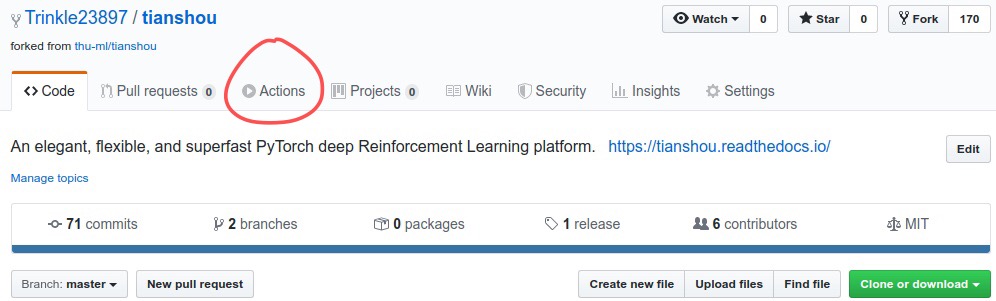
Click the
Actionsbutton in your own repo:
Click the green button:
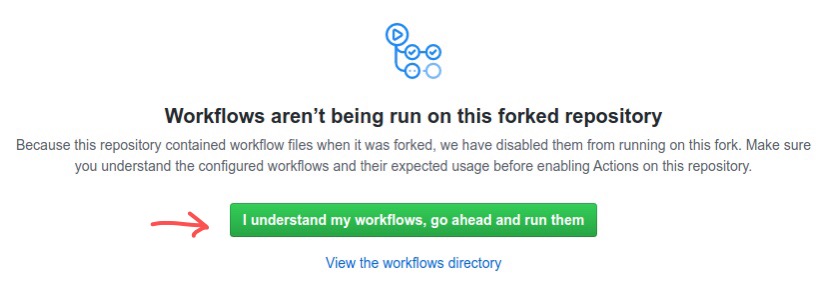
You will see
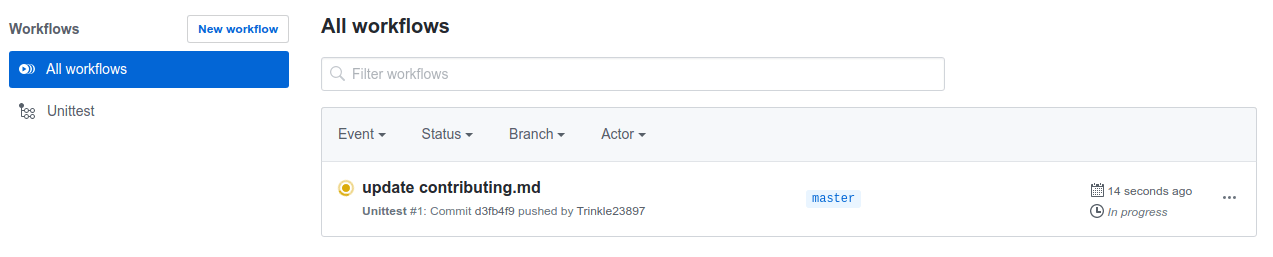
Actions Enabled.on the top of html page.When you push a new commit to your own repo (e.g.
git push), it will automatically run the test in this page:
Documentation#
Documentations are written under the docs/ directory as ReStructuredText (.rst) files. index.rst is the main page. A Tutorial on ReStructuredText can be found here.
API References are automatically generated by Sphinx according to the outlines under docs/api/ and should be modified when any code changes.
To compile documentation into webpage, run
$ poe doc-build
The generated webpage is in docs/_build and can be viewed with browser (http://0.0.0.0:8000/).
Documentation Generation Test#
We have the following three documentation tests:
pydocstyle (as part of ruff): test all docstring under
tianshou/;doc8 (as part of ruff): test ReStructuredText format;
sphinx spelling and test: test if there is any error/warning when generating front-end html documentation.
To check, in the main directory, run:
$ poe lint
$ poe doc-build